
Full Outlook editing
Create, edit, and delete items directly on the desktop, the same way you would in Outlook.
Windows utility for Outlook Classic
Keep your Outlook calendar, inbox, notes, tasks, and folders visible directly on your desktop without opening the full Outlook window.
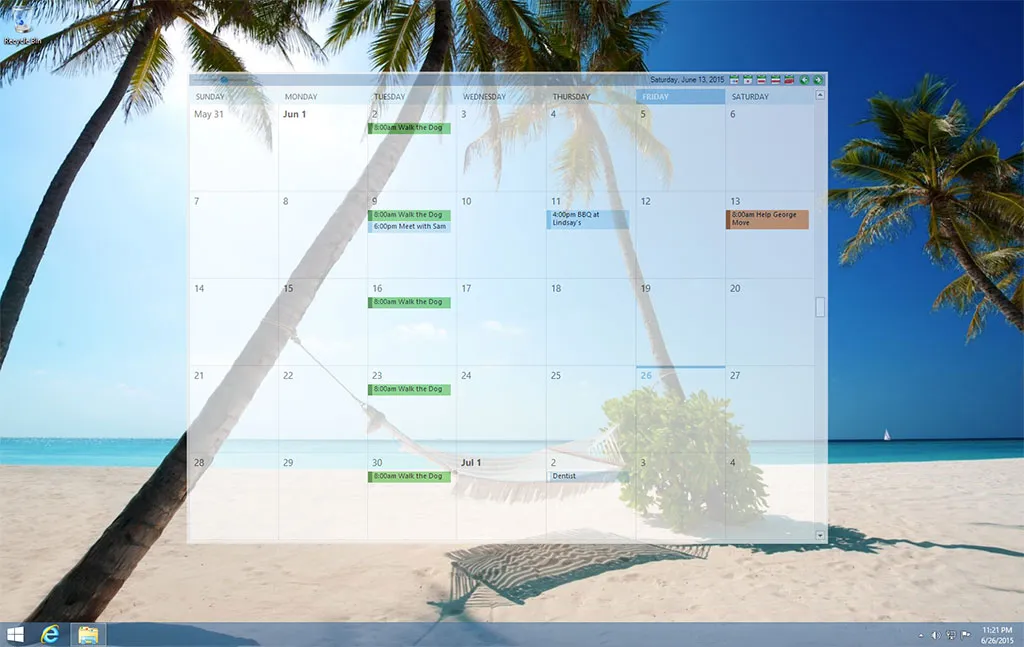
Create, edit, and delete items directly on the desktop, the same way you would in Outlook.
OotD windows stay on the desktop layer, behind your other applications.
Follows your Windows light/dark setting for the header bar, tray menu, and dialogs.
Set each window's position, size, and opacity. Calendar views use the time scale set in Outlook.
Displays correctly on high-DPI screens, and windows can be placed on any monitor.
Run several calendar, inbox, or task windows at once and assign each one to its own virtual desktop.
The tray icon shows the current day of the month and provides access to all settings.
Display any Outlook folder or view, including calendar, inbox, contacts, tasks, and notes.
The installer is code signed. Built-in updates verify the publisher's signature before installing, then restart the app.
Outlook on the Desktop displays a live Outlook view, such as a month, week, or day calendar, directly on the Windows desktop. Setup takes three steps.
Download and run the installer. If the required .NET runtime is not already installed, setup downloads and installs it.
OotD shows your Outlook Classic calendar on the desktop, behind your other windows. Use the tray menu to switch to the inbox, tasks, notes, or any other folder.
Position and resize each window and set its opacity. Add instances for other folders or monitors. The layout is saved on exit and restored the next time OotD starts.
OotD keeps your schedule, email, and tasks visible without switching to the Outlook window.
The latest OotD versions require Outlook Classic. If Windows has switched you to the new Outlook, switch back to Classic before using OotD.